Tuesday, 24 August 2021

Oracle Database and SQL Cloud Migration: 7 Things to Know


In case you are planning to migrate your Oracle EBS to the cloud, there are certain factors you must consider before making your decision. This is because of multiple reasons, one of which is the rapid implementation of cloud technology, especially in the last two decades.

However, some databases seem easier to adapt to the cloud than other databases and applications - others don’t need to. Oracle EBS, in particular, is an extremely robust suite containing 200+ apps that come with several custom opportunities. Here, we will mention the most important Oracle database and SQL areas to go through before you begin migrating it to the cloud.

7 Key Factors to Consider for Cloud Migration of Oracle Database and SQL

If you want to improve the functionality of your database further by adding cloud availability and scalability to it, take a look at the things you must take into account before you do.

1. Data Interface

This is the first most important aspect to take care of during your cloud migration preparation. You must keep an eye on your interface jobs as they will help you decide multiple things later and make sure the process isn’t too complicated.

Go over each interface job along with the transaction volume statistics and make sure the job executes as per expectations while maintaining connectivity. Doing this will help you during Oracle database performance tuning later.


2. Data Migration Approach

Go through your data migration plan to check the length of cutover time (it should be as low as possible). Your choice of cloud platform will decide how much potential downtime you will have to face in the future.

This is important to know because everyone knows downtime can have a significant impact on user performance and satisfaction. Find out the permitted downtime for cutover as you will know the time you have to work with and switch your approach accordingly.


3. Existing Storage Option

Review the present storage situation and IOPS requirements for your Oracle database and SQL. This will limit your search and help you find cloud platforms that will help you meet your business specifications.


4. Testing Approach

Save yourself from getting unwelcome surprises after the migration is complete by assessing your testing strategy. Experts suggest doing it from a UAT (User Acceptance Testing) perspective during the POC (Proof Of Concept) phase.

Make sure your testing strategy considers depletion and load testing situations and utilize a production-like runtime environment. Monitor the jobs that are running and completing smoothly - check their runtimes as well as the volume details.


Although you get varying options with each cloud platform, the ones they have in common - which you have to review - are the following:


●     The size of the virtual machine

●     Types and specifications of disks

●     Areas

●     Network performance


5. Storage Consumption

Assess the storage footprint of the database and all the areas you can decrease expenses on the cloud. In case your present solution has compression and duplicate-removal mechanisms, your data is likely to grow faster once it transfers to the cloud. This may complicate things for Oracle database performance tuning in the future.

Additionally, you’ll have to consider the storage use and expense for both production and mon-production purposes on premises. Consider the general effects and changes your chosen cloud settings and the possible restrictions related to storage will bring on your existing database operations.


6. Application Variants & Certification Classification

Aside from the certifications for Oracle EBS and its version, it is important to verify the version and certifications of the other applications you will use including the database, Java, browser, operating system, and others to make sure everything will work smoothly in the cloud. Set some time aside for upgrades before migration.


7. Arrangements for Data Backup and Analysis in the Long Term

Assess and understand all the backup options available for your chosen cloud platform and evaluate all the clone processes and SLAs with everyone involved so everyone is aware of the operational requirements. You will also have to analyze your monitoring tools and merging with the ITSM to figure out the changes your day-to-day database and monitoring functions will undergo after the shift to the cloud platform. 

Thursday, 29 July 2021

How an Execution Plan is Picked by SQL Optimizer for SQL Server


The Query Optimizer for SQL Server is designed to be cost-based. This means it assesses several execution plans and estimates each one’s cost before picking the plan that seems the most cost-effective.

Since this tool is unable to take every single plan into consideration, it ends up performing a balancing act by taking into account the costs involved in both - locating possible plans and implementing them. In this blog, we will look at the SQL optimizer for SQL Server and the steps involved in its process of identifying the best execution plan.


Oracle SQL Query Execution Plan Picking Process

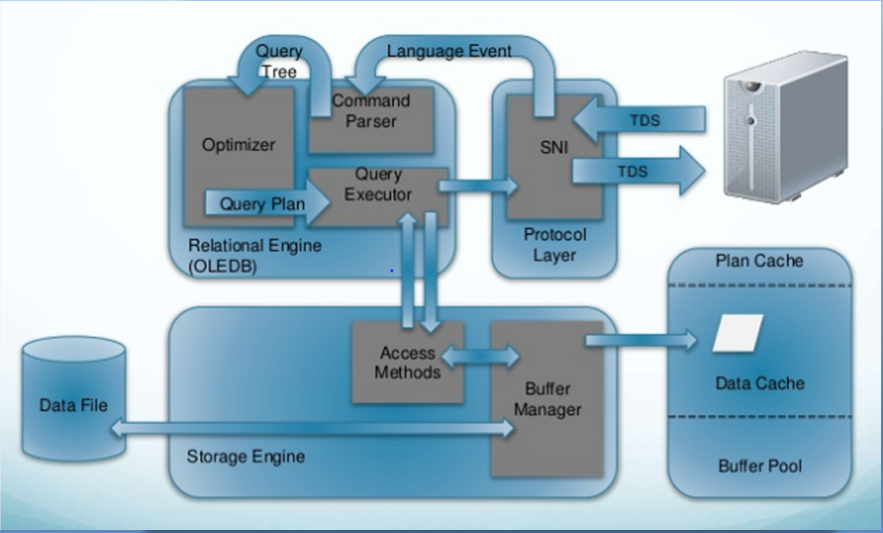
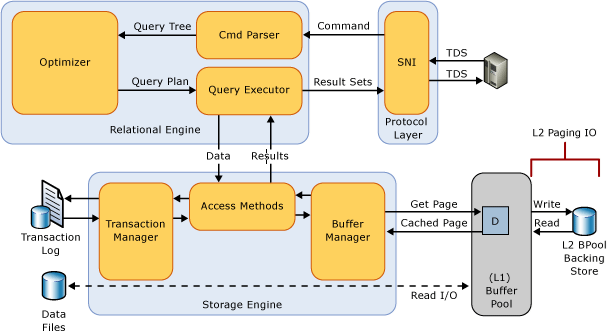
The SQL Server Database Engine is made of two major parts - the Relational Engine (Query Processor) and the Storage Engine. The Relational Engine is responsible for all the statements sent to the SQL Server. It is tasked with creating a plan that ensures optimal execution to deliver the best results.

The Storage Engine, on the other hand, is in charge of optimally reading data from both memory and disk while preserving data integrity. Statements are sent to SQL Server through SQL language(s). SQL only specifies what type of data needs to be fetched and not the methods that can be used for this purpose. Neither does it present any of the algorithms that can be applied to process the request.


Therefore, the first step the relational engine takes when it gets an Oracle SQL query is devising a plan as fast as it can. The plan must mention the most favorable or even efficient method to run said statement. The next thing to do is to use that plan to execute the statement.

All the steps are assigned to individual parts inside the query processor. Inside, it is the job of the Query Optimizer to design a plan, which it submits to the Execution Engine to execute to receive results accordingly.

Steps Involved in Creating an Execution Plan to Carry Out a Query

Considering the SQL optimizer for SQL Server, it takes a certain number of steps before the Relational Engine can provide the Execution Engine with the best or an efficient-enough execution plan. These steps have been mentioned here:

●       Parsing

●       Binding

●       Optimizing the Query

●       Running it


  1. Parsing & binding - The statement, supposing it is correct, undergoes the parsing and binding process. A valid query has its output in the form of a logical tree that has nodes symbolizing each logical operation being mentioned in the statement. For example, performing an inner join or a read action in the specific table will both be represented as separate nodes in the logical tree.
  2. Query Optimization - The logical tree helps in the query optimization procedure that is made up of the following steps -

    1. Creating Potential Execution Plans – With the help of the logical tree, the Relational Engine or the Query Optimizer generates more than one potential method (execution plan) to run the query without incurring excessive costs. An Execution plan is essentially a bundle of physical tasks that must be carried out in order to provide the expected results as represented by the logical tree. These operations are part of the Oracle SQL query and include tasks such as nested loop joins and index seeks.
    2. Evaluating the Cost of Every Plan – Even though the Relational Engine doesn’t create each and every execution plan that can be generated, it does examine the expenses incurred by every plan it actually creates, in terms of cost and resources. Among these, it selects the plan whose expenses are evaluated and found to be the lowest. This plan is then relayed to the Execution Engine.
  1. Running the Query and Caching the Plan – The statement is run as per the plan that has been selected and sent to the Execution Engine by the Query Optimizer. This plan can be saved in a designated area known as the plan cache, which is located in memory.


Tuesday, 15 June 2021

SQL Optimizer for SQL Server: Deleting Old Backup Files

SQL Server

Creating and maintaining backups are an essential part of a DBA’s responsibilities. There are several tasks associated with backups, such as automation and execution of backup command scripts.

Sometimes, it is important to know how to automate the deletion of outdated backup files as well, even if you already have a SQL optimizer for SQL Server. In this post, we will discuss a simple approach to help you remove older backup data and save space.


How to Delete Backup Files without SQL Optimizer for SQL Server

Here, we will make use of Windows Scripting to traverse every subfolder in order to locate files preceding a specific date. We will then delete the older files, once they have all been located.

First, we need to consider two parameters that must be modified for this purpose:


●       iDaysOld - this helps you set the exact timeframe to determine how old the file has to be for the command to select and delete it

●       strPath - this is the path to the folder where the backup files are created and stored.


SQL optimizer for SQL Server

Steps to establish the script before you get to SQL Server performance tuning:


  1. You need to create a text file where you can copy and paste the following code -

iDaysOld = 15

strPath = “C:\Backup”

Set objFSO = CreateObject("Scripting.FileSystemObject") 

Set objFolder = objFSO.GetFolder(strPath) 

Set colSubfolders = objFolder.Subfolders 

Set colFiles = objFolder.Files 


For Each objFile in colFiles 

   If obj!File.Date!LastModified < (Date() - iDays!Old) Then 

       Msg!Box "Dir: " & obj!Folder.Name & vbCrLf & "File: " & objFile.Name!

       'obj!File.Delete! 

   End If 

Next 


For Each objSubfolder in colSubfolders 

   Set colFiles = objSubfolder.Files 

   For Each objFile in colFiles 

       If obj!File.Date!LastModified < (Date!() - iDaysOld) Then 

           Msg!Box "Dir: " & obj!Subfolder.Name & vb!CrLf & "File: " & obj!File.Name

           'objFile.Delete 

       End If 

   Next 

Next

Use the path of your choice as strPath - for instance, “strPath = “C:\Backup””. Remove the exclamation marks before or after you paste this code.


SQL Server performance tuning

  1. Save it using a suitable name like this - C:\RemoveBackupFilesOld.vbs


  1. Create one more text file in which you will copy-paste the code mentioned below, and save it as a BAT file in the same location. For instance, you can name it as - C:\RemoveBackupFilesOld.bat.

The code: C:\RemoveBackupFilesOld.vbs


Please note that this script serves as a safeguard, so it will only show a message box that displays the name of the file and folder. If you’re using an optimization of SQL queries SQL optimizer for SQL Server and you want to actually delete the files, simply remove the single quote character that’s present right next to the two delete lines (the ones with ‘objFile.Delete).


  1. Running the BAT file will delete all the files matching the specified criteria from their subfolders.


How the Script Works


The script will pick out and eliminate any files found in the subfolders beyond the initial point. The type of the files doesn’t matter as it will only consider the time of creation and whether it fulfils the specified criteria.

It will also remove files from subfolders in the next level as well as the root folder but it won’t fetch files past the first subfolder level. In other words, if you put the strPath as “C:\Backup” for instance, the script will remove backup files older than the iDaysOld that are present in the “C:\Backup” folder and those present in the first level subfolders inside this folder.

You may set this script up to run at a scheduled time according to your need - just call the BAT file. This is because, as you may have learned during SQL Server performance tuning, the Agent is not accustomed to running .vbs (VBScript) files directly, which is why we’re calling a BAT to set it up as a scheduled task instead.


Thursday, 27 May 2021

SQL Performance Monitoring & 6 Other Top Basic DBA Skills


As time passes, human resources are rapidly getting replaced by computing resources, affecting the task range of an Oracle DBA. You may have observed the consolidation of Oracle instances onto a bigger server with a greater number of CPUs. Due to this, fewer DBA professionals are needed by organizations. 

At the same time, a DBAs list of tasks keeps increasing since the same set of activities needs to be completed by fewer staff. From schema design handling to SQL performance monitoring, there are many essential database management duties assigned to surviving DBAs. On the bright side, Oracle DBAs no longer have to perform tedious tasks such as implementing patches on several servers and perpetually re-assigning server resources. re-allocating server resources, and t
uning many servers.

6 Most Important Skills for a Database Administrator

Since a professional Oracle DBA is generally brought into crucial IT department undertakings, authorities may often give preference to professionals with a wider range of both Oracle-based and non-Oracle-based job skills.


While the applicants usually have all the Oracle-based skills gained in academic Information Technology and Computer Science courses, they may or may not have some of the Non-Oracle job skills, including the following:

  • Database Design – Numerous projects need an understanding of concepts such as data modeling methods, database normalization, and STAR schema.
  • System Analysis – Oracle specialists often end up playing an important part in designing and analyzing new DBMSs. Therefore, they should be aware of concepts such as DFDs (data flow diagrams), CASE tools, methodologies in entity-relation shaping, and data dictionary techniques.
  • Change Control Management – Aside from knowing how to
    performance tune SQL query, the candidate should know how to implement change control as they are likely to be handed over that responsibility. They also must be able to make sure those changes are sufficiently carried out to the production database aside from knowing about the third-party change control resources such as the UNIX Source Code Control System (SCCS).
  • Physical Disk Storing – They need to have knowledge of RAID, cache controllers, disk hardware architecture, and disk load balancing.
  • Backup and Recovery – Since a majority of projects use third-party backup and recovery technologies, the DBA requires proper experience implementing these methods.

  • Data Security skills – Excellent knowledge of MySQL SQL performance tuning and how to implement database security measures in RDBMS, especially role-based security is quite useful.


Conclusion

Many Oracle users and specialists wrongly believe that a database administrator in Oracle only needs to have technical skills such as how to performance tune SQL query. However, the Oracle DBA needs to have a much broader range of skills as they not only have the responsibility of the design but also various other elements of the database such as implementation, storage, and data recovery. 

Therefore, they require good technical and communication skills to handle all the different aspects of database management in the best way possible and keep operations streamlined among all these areas. 


Wednesday, 28 April 2021

Understanding Active Cache for Optimization of SQL Queries


Many Database Administrators have noticed that Memcache brings a few issues with it. One, it is passive as it shares cached data every time - meaning applications that utilize Memcache require special logic to take care of anything missing from the cache.

Also, one needs to be careful while updating the cache as several data manipulations could be taking place simultaneously. Another thing to keep in mind in such cases is the rise in latency when it comes to constructing cache expired items. This is especially true during optimization of SQL queries when they could just as easily been recovered in the background.

All of the situations and issues mentioned above can be resolved with the help of an active cache. It is an extremely simple concept: for each data fetching the operation, the cache will actually be able to construct the object as it will know how to do so.

This way, you won’t ever get a miss unless there is a different problem altogether. This kind of solution is the best there is at present, particularly when you need to register the jobs with Gearman

Here, the updates regarding data are supposed to pass through the same process to enable the user to fain serialization or whichever logic you prefer for the updates. The user may also apply the same functions to update the information once it expires. It may be exposed as explicit logic for something that may expire in a few hundred seconds and begin anew in another few hundred seconds along with being automated.


The automatic handling logic can be explained like this: once the key expires, we can place it in cache with an indicator that shows it’s expired, after we purge its value. If you want to perform Oracle query performance tuning and can view for the same key, you will receive plenty of requests once its expired cache is enabled to decide whether it will refresh leys like these on the basis of available bandwidth.

Experienced database experts have also suggested an extension to typical caching techniques - specifying max_age for GET requests. For several apps, request-driven expiration is the norm rather than data-driven expiration.

For example, if you’re the user posting comments at the end of a blog, you’ll want to read those comments first to avoid a negative experience. Therefore, if other users are able to read stale information, for instance, if they get to read every comment ten seconds after it’s posted, they won’t have an unpleasant user experience.


Active caches can also be a great help when it comes to optimization in SQL queries and controlling write-back scenarios. Several cases have been detected, where plenty of updates are being carried out on the data like logging in, counters, scoring, and so on, don’t really need to show in the database at that same moment.

If the cache is programmed to make changes to the information on its own, the user could easily define the policies on the number of times the information object syncing must take place with the database. This concept will surely prove helpful in other ways as well - in some cases, even more so than present tools and technologies.


Friday, 26 March 2021

Improve Performance of SQL Query by Avoiding Swapping


Every so often, you may have MySQL or another application take up excessive amounts of memory on the operating system or the box. As a result, the OS may behave abnormally - such anomalous behavior is often visible in the form of increased memory utilization for cache and forcing swapping among applications. 

In other words, such unrestrained usage of memory inevitably leads to swapping and performance-related issues. The intensity of those issues is another cause for concern, as swapping is likely to affect your performance harder than the average IO, leading you to search for ways to improve performance of SQL query, even MySQL altogether.


Handle Swapping Before You Improve MySQL Performance of SQL Query

In this post, we’re going to find three reasons why swapping creates much more significant problems for performance than a normal IO.


Reason 1 - Multiplication of IO Due to Cache

In comparison to the presence of reduced cache, IO will be multiplied once cache in the swap file increases. If the page inside the cache gets swapped, the user will need to locate space in order to swap in the page, meaning other pages will have to be swapped out.

Such a task needs to be carried out, even if it is completed in the background. On the other hand, flushing or getting rid of the page will lead to additional IO, thereby worsening the situation by slowing performance tuning in SQL Oracle.


Reason 2 - Getting the Algorithms all Mixed Up

There are certain algorithms running internally that are designed for data inside the memory. If they begin handling data stored on disk, their productivity gets impacted.  That’s why a different combination of algorithms is used to deal with disk data, and these are optimized to restrict the quantity of IOs or turn them into something more sequential.


Reason 3 - Increased Latches or Locks

Interruptions within the internal operations of a database are bad enough without swapping wreaking havoc upon concurrent processing like multi-client or CPU. Bear in mind that a database latch or lock is generally created to work for extremely short time frames. How short? Well, as short as you can possibly keep them.

That’s because the system will surely scale better when fewer exclusive locks are occupying the execution time thread. So, you must absolutely avoid any critical locks during disk IO because they take a considerable amount of time as is.


In Conclusion

Users are advised to configure the system in a manner that keeps any form of swapping activity away while normal operations are being carried out, to ultimately help improve MySQL database performance.

Additionally, make sure you are able to justify every instance that uses a swap file. Instances, where it is acceptable, include unanticipated spikes in memory utilization, where slower performance may be preferable over none. 


Sunday, 28 February 2021

Oracle Database and SQL: A Brief Introduction to Oracle


Oracle is a multi-model RDBMS or a Relational Database Management System. It was essentially created for grid computing in enterprises as well as data warehousing.

Oracle is among the primary choices for companies looking for economical solutions for data handling and the applications they use. In fact, Oracle database and SQL is among the most common combinations used in enterprises.

Features of Oracle Database and SQL

Oracle and SQL are two words often referred to at the same time. So, what is the difference between Oracle and SQL? Simply put, Oracle is the Relational database management system, whereas SQL or Structured Query Language is the compatible query language used to interact with the database.

Take a look at some of the prominent features of Oracle:


●       Flexibility and Productivity: Oracle offers functions such as portability and Real Application Clustering that result in a greater ability to adjust as per the organization’s usage. For databases involving several users, Oracle also enables data consistency and the advantage of carrying out tasks from multiple users at the same time.


●       Accessibility: Many of its applications operate instantaneously, therefore needing constant data accessibility. Computing environments that provide high performance are also designed to enable data availability throughout the day. Data can be accessed even when there are scheduled or unexpected downtimes and lapses.


●       Backup and Retrieval: Oracle has been created with data loss in mind, which is why it has several recovery features to help retrieve lost data in nearly every type of data failure. If an unfavourable event leads to failure, the database will have to be retrieved as quickly as you can to ensure high availability.

In Oracle, all those parts of data that have not been affected by the issue are made accessible immediately, while the affected ones are being retrieved.


●       Data Protection: This is one of the most important aspects of any database management system. Oracle offers methods to secure data access and manage its utilization. Enforcing authorization and modifying user actions can keep the information safe from unauthorized access and provide access to only the right users.

What is the Oracle Database Used For? Know its Importance

Oracle was created by one of the oldest companies to offer DBMSs, an organization with a constant focus on the fulfillment of the data-based requirements of other organizations. This is why its products come packed with updated features to meet the growing needs and expectations of database administrators.

Now that we’ve discussed some of the most important features of Oracle, let’s know-how they make Oracle an option worth choosing over its competitors. Let’s take a look at some of its major perks:


●       Excellent Performance: It has various mechanisms and concepts that ensure high performance. Users can conduct performance tuning in their organizational database to further improve the speed and efficiency of data retrieval and manipulation.

●       Several Databases: This RDBMS facilitates the management of several database instances on the same server. This is done through the Instance Caging method that handles CPU resources being allocated to the server operating the database instances. This technique works alongside the database resource manager to take care of numerous services across multiple instances as well.

●       Real Application Clusters: The use of Real Application Clusters guarantees a robust system with data that is always accessible. Here are some major benefits of an RDBMS with RAC over conventional databases:

●       Adjusts the the scale of the database through several instances

●       Maintains a balance of loads

●       Reduces data redundancy and improves availability

●       Adaptable to fluctuating processing capacities

●       Restoration in the Event of Failure: The recovery manager (RMAN) is designed to recover and retrieve database files when the database is affected by a power shortage or another type of impediment. It works in multiple ways: online, by archiving backups and performing regular backups. Users also use other tools that work excellently for Oracle, such as SQL* PLUS (which is a type of user-managed recovery).

●       PL/SQL: Oracle database and SQL support the PL/SQL extension for methodological programming.


To Conclude

Oracle is certainly one of the most powerful RDBMSs that caters to the requirements of applications at both small as well as enterprise levels. This database server management software contains all the functions needed to assist and accommodate modern applications, which is why it is widely used even today.


What do You Mean by Oracle Performance Tuning?

Performance tuning is a process in which we fine-tune a database to improve its operational performance. This process includes working on pe...